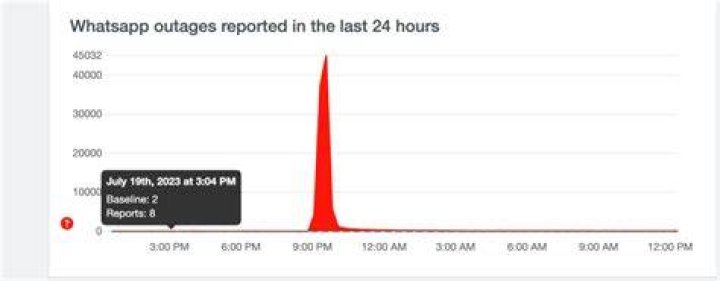
WhatsApp down updates — Hundreds of thousands of users report issues sending messages and say app not working

Michael Hansen
Published Sep 21, 2026

You can prioritize your favorite contacts
There’s an easy way to prioritize your favorite people on WhatsApp.
If you have a busy WhatsApp, sometimes loved ones can get buried below groups and work chats.
But it’s actually possible to pin several chats so that they stay at the top of your main conversation feed.
Go into your chat list and then swipe right on a conversation.
You can then tap Pin and that specific chat will stick to the top of the feed.
And if you change your mind later on, you can unpin at any time.
What do the blue ticks mean on WhatsApp?
The two blue ticks are a good sign - that the message has been sent and read.
If you're not getting a response, it could mean that the person opened the message and forget to reply.
Or it could mean they're ghosting you...
What does one grey tick mean on WhatsApp?
If you see a single grey tick it means that the message you've seen has been delivered to the Whatsapp server.
However, this doesn't necessarily mean it's been received on the receipt's device yet.
This could mean their phone is switched off or without signal at the moment.
But if it goes on for a while, it suggests that you may have been blocked.
Don’t let your messages live forever
WhatsApp has a handy feature that will automatically self-destruct new texts after a day.
The update is aimed at boosting your privacy – by destroying old WhatsApp messages.
You can set Disappearing Messages to automatically turn on for all new chats – without affecting existing conversations.
And two new durations have been added for Disappearing Messages, 24 hours and 90 days.
So now you can choose from four options in total: 24 hours, 7 days, 90 days or Off.
Go to the app Settings > Account > Privacy and then turn on Default Message Timer.
How to turn off Last Seen
Meta, who now owns WhatsApp, announced three privacy-focused features to the service last year – one of which sought to ease people’s concerns.
One feature now lets users pick specific people from their contact list who can see when they were ‘last seen’.
To turn off your last seen you can go into your settings in WhatsApp.
- Android: Tap more options > Settings > Privacy
- iPhone: Tap the settings icon in the bottom right corner > Account > privacy
- Desktop: Click menu > settings > privacy
Once you are inside your privacy settings you should see “Last Seen & Online.”
After selecting that option, your screen will show you the various options of who can see your last seen status – including nobody.
Depending on your selections you will be able to tweak your settings so that only your chosen contacts see when you were last using the app, or nobody can.
How do I edit WhatsApp messages?
You can edit WhatsApp messages after they've been sent for a limited amount of time.
It works on both iOS and Android.
To do it, just press and hold down on the message you wish to edit.
A menu will appear.
Select "Edit."
Make the changes you need and away you go.